Blog
Want an AI Agent in Your Business? Start With One Process in 30 Days.

SME owners30-day startEvolve Robot Lab
7 min read
Who this is for: Owners and managers of small and mid-size businesses — shops, clinics, agencies, traders, coaching centres, factories, service firms — who keep hearing “AI agents” and still do not know the first safe step.
Who this is not for: People hunting model benchmarks, coding frameworks, or a 50-slide transformation deck.
It is 7:40 pm. Your phone still lights up with unpaid bills, missed WhatsApp enquiries, and “sir, please send the document.” You did not hire people to chase paper all day. But that is where the time goes.
An AI agent will not fix your whole company in a week. It can take one repeat process — follow-ups, document checks, appointment replies — and run it while you keep the final say. This guide shows where to start, which examples are real, which free tools to try yourself, and how to decide in 30 days.
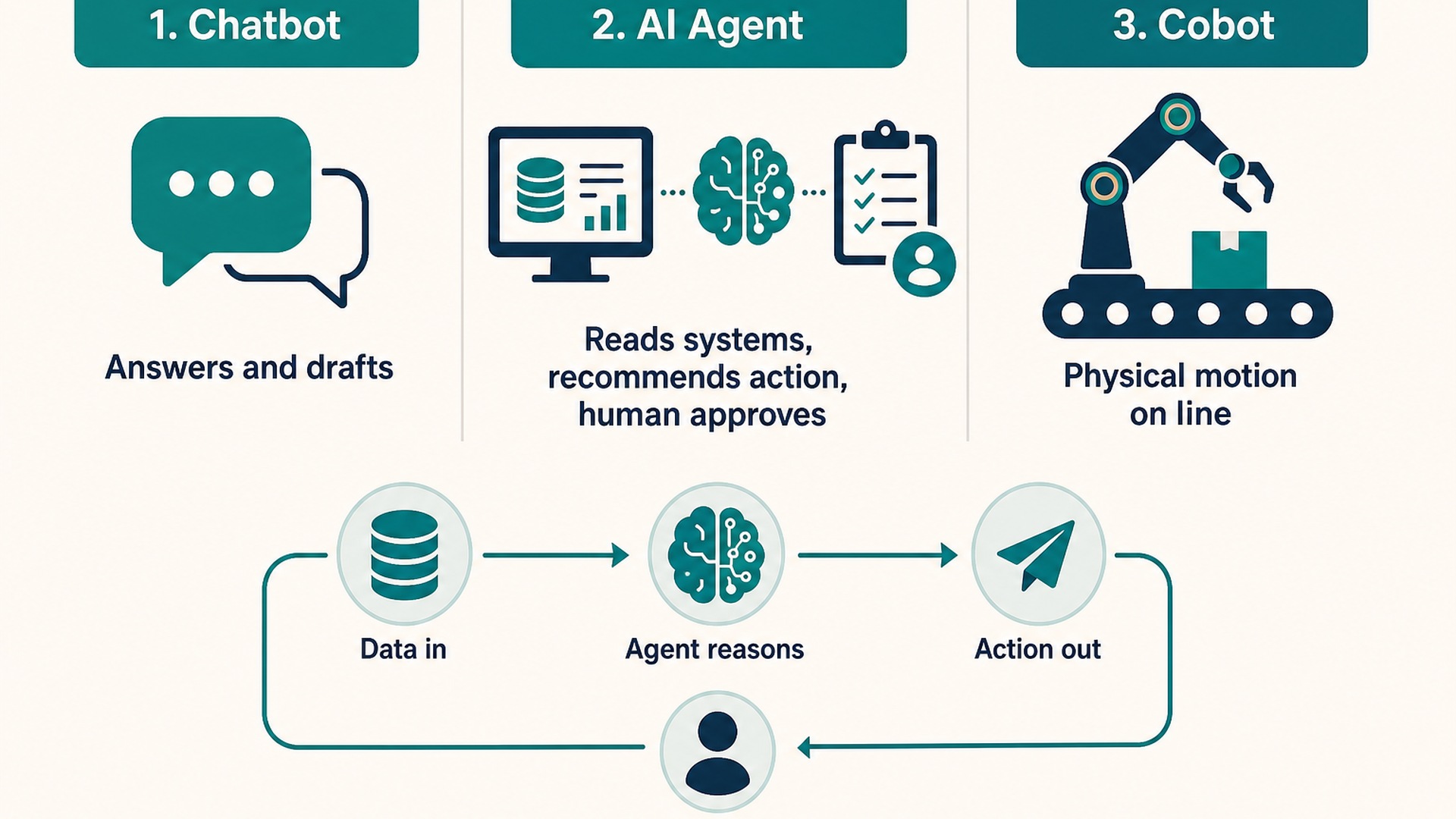
Remember this line: ChatGPT helps a person write. An AI agent does a job in your process — then stops and asks you when something looks wrong.
1. What an AI agent means in plain English
| Chat tool | You ask. It answers or drafts. You still do the work. |
|---|---|
| AI agent | It watches a trigger (new lead, overdue invoice, email with PDF), follows your rules, takes steps, and only escalates exceptions to a human. |
Good first agents are boring on purpose: same steps every week, clear rules, one success number. If every case needs a unique judgment call, start with “prepare the file for me” — not “decide for me.”
Any SMEOne process
2. Four clear examples (explained simply)
Each example below has the same shape: the pain → what the agent did → what changed → who else it fits. Numbers come from public case write-ups, not invented India demos.
Example A — Unpaid invoice follow-up (cash stuck outside)
The pain
A promotional-goods manufacturer had about 10% of invoices 90+ days overdue. One person spent roughly an hour a day sending reminders. Many overdue accounts were ignored until they were already very late.
What the agent did
It took the overdue list, ran a reminder sequence (email / SMS / phone), and showed the manager a simple board: paid, promised, or dispute — instead of working every account by hand.
What changed
Overdue customers were contacted from day one past due, not after a month of silence. The accounts person got that daily chase time back for real exceptions. Source: Squirrels.ai case.
Who else this fits
Any SME on credit terms: traders, distributors, printers, fabricators, B2B service firms — anyone with an Excel aging list and one tired accounts person.
Example B — Missed leads and appointments (revenue that never books)
The pain
Clinics, salons, tuition centres, agencies, and consultants lose money when WhatsApp / Instagram / website enquiries sit unanswered. The same pattern shows up again and again: leads go cold overnight, and teams blame “lead quality” when the real failure was speed.
What the agent did
A booking / receptionist-style agent replies fast, asks a few qualification questions, checks calendar rules, books or offers slots, and reminds before the visit. Humans take over for price fights and special cases.
What changed
Fewer missed first replies. Fewer no-shows when reminders are automatic. Staff spend time on the visit — not on typing the same confirmation again. Pattern sources: Vendasta SMB agents, SME appointment flow playbook.
Who else this fits
Any appointment or enquiry business: clinic, salon, coaching centre, realtor, interior designer, gym, repair service, B2B agency.
Example C — Reading supplier emails and PDFs (matching without the morning pile)
The pain
Wholesale buyer teams open dozens of confirmation emails and PDFs every day, then compare quantity, date, and price to the purchase order by hand. Slow, boring, easy to miss a change.
What the agent did
At Lemvigh-Müller (Denmark steel / technical wholesale), agents read supplier confirmations, compared them to the order, and only flagged humans when something did not match.
What changed
Public write-up: more than 90% of confirmations handled without manual review, within weeks of go-live. Source: SAP Lemvigh-Müller story.
Who else this fits
Traders, importers, factories, project firms — anyone whose suppliers still confirm on email / WhatsApp PDF.
Example D — New customer or new hire document chase (incomplete files)
The pain
Banks, insurers, clinics, and HR desks chase the same missing papers: ID, GST, address proof, signed forms. The work is not hard. It is endless.
What the agent did
Checklist agents send the list, remind on a schedule, mark what arrived, and escalate only the incomplete or suspicious files to a human.
What changed
Files become complete faster. Staff stop being full-time reminder bots. This is the same shape as invoice chasing — only the document list changes.
Who else this fits
Any owner onboarding customers or staff: CA firms, staffing, schools, clinics, and factories hiring in batches.

Real toolsSME stacks
3. Where to start (three questions)
- Which process wastes time every week? Write it in one sentence. Example: “We chase unpaid invoices.” or “We reply late to clinic WhatsApp leads.”
- What one number proves success in 30 days? Hours saved, % of leads answered in 10 minutes, days to collect cash, % of files complete.
- Who owns it on the business side? Name a person who feels the pain — not “IT will see.”
Cannot answer all three on one page? Do not buy software yet.
4. Try it yourself: builders we recommend
You do not always need a big vendor on day one. Many owners (or a junior who is comfortable with tools) can test a small agent on these platforms. Start free or cheap. Keep money actions on human approval.
| Tool | Best if you… | Simple first try |
|---|---|---|
| n8n | Want visual workflows + AI steps, and maybe self-host later | New Gmail/Sheet row → AI summarises → draft reply → you approve → send |
| CrewAI | Have a developer / technical intern and want role-based agents in code | “Researcher + writer” crew for a weekly report, or a document-check crew with a human review step |
| Make (Make.com) | Prefer a visual canvas and faster setup than code | Lead form → qualify with AI → create CRM card → notify WhatsApp/Slack |
| Zapier Agents | Already live in many SaaS apps and want the easiest start | Inbox triage, simple follow-ups across the apps you already pay for |
Practical rule: non-technical owner → Zapier Agents or Make first. Comfortable tinkerer / small tech help → n8n. Building a custom multi-step team of agents in Python → CrewAI. Production n8n patterns people actually ship include email triage, invoice categorisation, and support replies with approval — see n8n AI agent workflow examples.
Safety for DIY: never let a first agent send money, change prices, or message all customers unsupervised. Draft → approve → send. Expand autonomy only after Week 2 looks clean.
5. The 30-day plan
Week 1
Write the process
- One page: trigger → steps → output.
- Name the owner.
- List the real tools (Sheet, Gmail, CRM, WhatsApp).
- Red line: what needs your yes.
Week 2
Practice offline
- Build in n8n / Make / Zapier / CrewAI — or with a partner.
- Run last month's cases first.
- Fix bad phone numbers and incomplete forms.
- Train 2–5 people on stop rules.
Week 3
Go live small
- One branch, one product line, or one lead source.
- Track your one number.
- Money and reputation stay on human approval.
Week 4
Keep, fix, or stop
- Did the number move?
- Do people trust it?
- Day 30: scale, change process, or kill. No endless pilot.
Human sign-off30 days
6. First processes by business type
| Shop / trader / distributor | Unpaid invoice reminders · Missing GST / e-way docs · Stock reorder alerts |
|---|---|
| Clinic / salon / coaching | WhatsApp lead reply · Appointment book + remind · Review request after visit |
| Agency / consultant / CA firm | Lead qualify + CRM update · Document checklist · Weekly status draft for clients |
| Factory / plant office | Supplier PDF match · Invoice-to-PO check · Maintenance request routing |
Pick one row item. Winners finish one loop. Losers buy “AI for everyone” and stall.
7. Five questions before you pay anyone
- Which one process are we fixing first?
- Which tool or list does it read — show me live?
- What can it do without asking a human?
- Where is yesterday's log?
- What number must improve by day 30?
Fuzzy answers = walk away — whether the seller is a big vendor or a freelancer with pretty slides.
8. Mistakes that kill the first month
- Starting with five processes at once
- No business owner — only “the tech person”
- Full send access on day one
- Calling a chat box an agent
- No day-30 keep / fix / kill decision
Stuck choosing the first process? We can help.
Bring the weekly chase that drains your team. We will help you write the one-page process, pick a DIY path (n8n / Make / CrewAI) or a build partner path, and set the day-30 score — in plain language. Talk to Evolve Robot Lab →